Achilles + Your Coding Agent: A Security Workflow That Actually Works

AI coding agents write a lot of code now. Codex on the ChatGPT desktop app, Claude Code in your terminal, OpenCode wherever you like it. They are fast, they are cheap to run, and they will happily introduce a hardcoded API key, a vulnerable dependency, or a pull_request_target workflow without breaking stride. The question is not whether your agent will write insecure code. It is what catches it before merge.
This post walks through the workflow we use: your agent writes the code, Achilles reviews it, and the two talk to each other over MCP. You can also skip the agent loop entirely, run Achilles yourself, and send a one-click prompt back into your harness when you find something. Both paths work, and both are free.
The problem with asking your agent to self-review
You can paste a diff into your coding agent and ask "is this secure?" but you already know how that goes. The agent re-reads files you already paid to read, invents CVE numbers when it feels uncertain, and either everything is fine or everything is on fire. There is no durable record, no triage state, and no way to know what it actually checked.
Achilles takes a different split: engines write, the model judges, the ledger remembers. Deterministic engines scan your tree on your machine for secrets, dangerous code patterns, vulnerable dependencies, and risky CI or cloud config. Findings land in a local SQLite ledger with stable ids that survive rescans. The model only ever reasons over confirmed evidence, never over a generic repo dump.
That structure is exactly what makes it a good teammate for a coding agent instead of a competitor.
Path one: your agent kicks off Achilles over MCP
The first workflow is hands-off. You have Codex, Claude Code, or OpenCode installed as your daily driver. Add Achilles as an MCP server:
{
  "mcpServers": {
    "achilles": {
      "command": "achilles",
      "args": ["mcp"]
    }
  }
}
This config works in Cursor, Claude Code, Codex, and OpenCode alike. Once connected, your agent gets a set of AppSec tools it can call on its own:
| Tool | What it does |
|---|---|
appsec_scan | Start a scan on a workspace, fast or deep |
appsec_query | Query the ledger for open findings and details |
appsec_investigate | Run the investigator/validator loop over selected findings |
appsec_brief | Produce a copy-pasteable fix brief for a finding |
appsec_verdict | Resolve a finding as confirmed, false positive, or fixed |
appsec_triage | Work the triage queue |
appsec_utils | Hashing, redaction, encryption, SBOM |
appsec_intel | External intel lookup (KEV, EPSS, Socket, NVD-style feeds) |
A typical session looks like this: you ask your agent to add an OAuth flow, it writes the code, and then instead of asking you to trust it, it calls appsec_scan on the workspace, reads the findings with appsec_query, and patches anything it introduced before you ever see the diff. If your agent claims the code is clean, that claim is backed by ledger rows, not vibes.
Because findings are ledger-aware, a finding you dismissed yesterday does not come back as "new" today. Triage state lives in the local database, not in the chat session.
Path two: run Achilles yourself, chat interactively
The second workflow is hands-on. Open the Achilles desktop app, log in with any model you already pay for (Claude, ChatGPT, Gemini, OpenCode, OpenRouter, Grok, Ollama, or any OpenAI-compatible endpoint - your keys stay local), pick a folder, and hit Scan.
Fast mode is extremely token-efficient and can cost as little as pennies: the engines do the deterministic work and the model only judges. Investigate and Deep add a capped agent review on top where findings must quote shown source to stand. Either way you end up in the same place: a Findings rail you can triage, with each finding showing path, line, evidence snippet, severity, and engine.
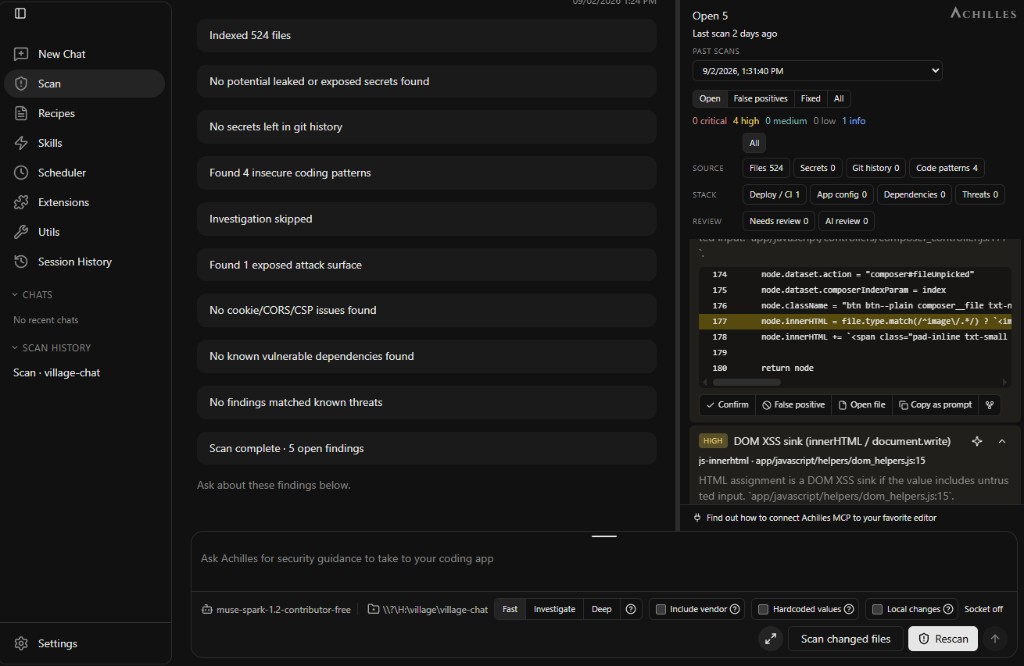
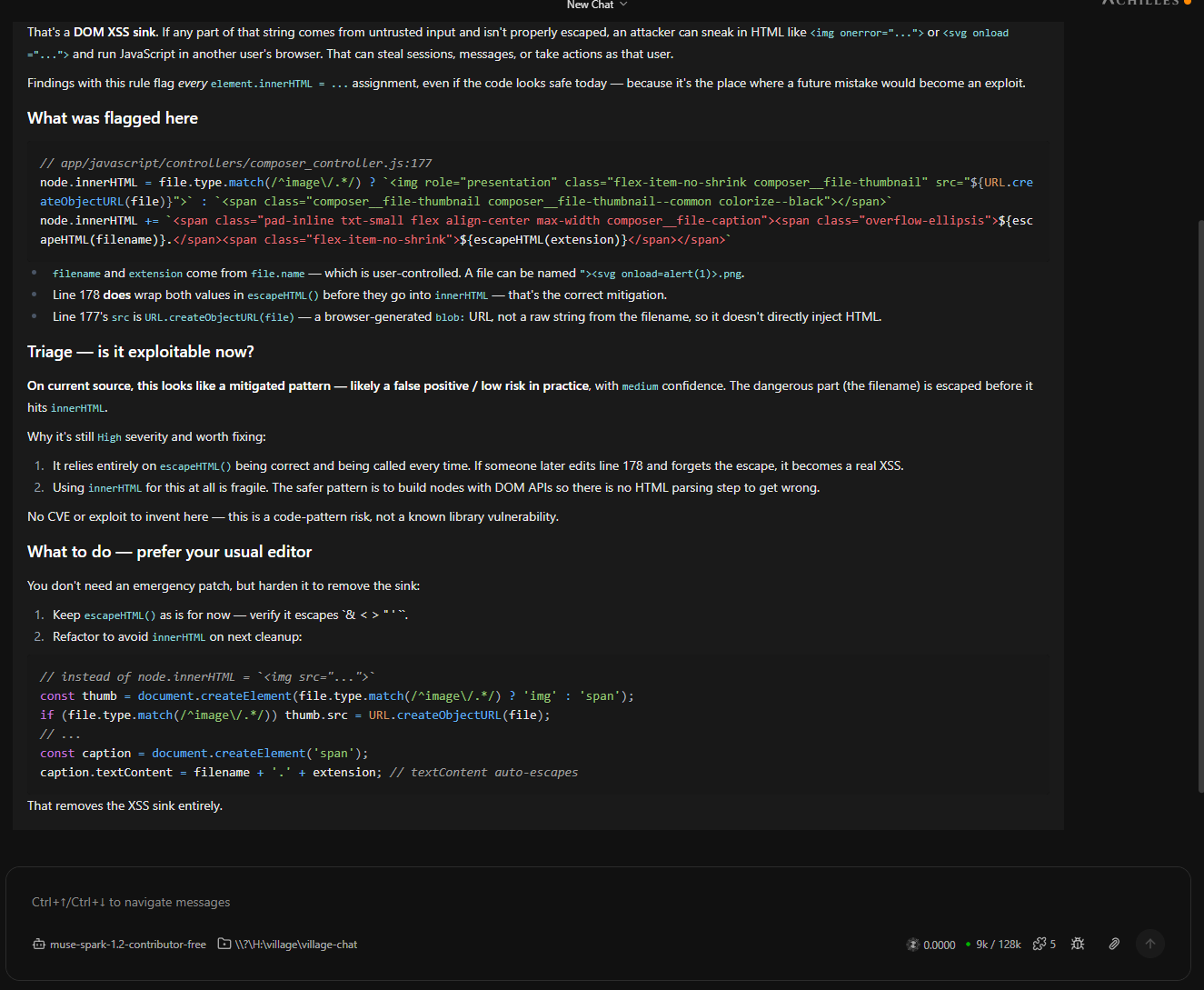
From here you can chat with Achilles about a finding, ask follow-up questions, or open the Code Map to see which route actually reaches that XSS sink. When you are satisfied that something is real, you have a decision to make: who writes the fix?
The one-click handoff: copy as prompt
This is the part that ties the two worlds together. Every finding has a Copy as prompt button. One click and you get a complete, ready-to-paste fix instruction prompt for your agent - impacted paths, line numbers, functions, evidence, severity, recommended next steps, and the triage resolution criteria all included.
You do not describe the bug to your agent. You do not paste files. You paste one prompt and your harness has everything it needs to write the patch.
A concrete example of what this catches in practice:
- Hardcoded values. The secrets engine flags an AWS key or a Postgres URL committed three weeks ago, redacted preview included, across the working tree or your local git history.
- Vulnerable or risky libraries. The SCA engine reads your lockfiles, checks them against OSV, and flags known CVEs plus pinning problems, risky lifecycle install scripts, and typosquat lookalikes. Optional Socket alerts add supply-chain risk signals on the same packages.
- Supply chain and CI risks. The surfaces engine flags
pull_request_target,persist-credentials, curl-pipe-shell, public S3 buckets, privileged containers, and similar patterns in your GitHub Actions, Terraform, Docker, and Kubernetes config.
Copy as prompt works the same whether the finding came from an interactive chat session or from a scheduled recipe. The prompt your agent receives is grounded in ledger evidence, which is why it tends to produce accurate patches on the first try instead of hallucinated fixes for problems that do not exist.
Same ledger, every surface
The detail that makes the mixed workflow work is that all surfaces write to the same local ledger. You can:
- Run a scan in the desktop in the morning and triage findings over coffee.
- Have your OpenCode agent call
appsec_scanon the same repo in the afternoon. - Let a nightly scheduled recipe do a fast scan plus recap, headless via the CLI.
All three land in the same achilles.db. A finding is confirmed, false positive, or fixed exactly once, no matter who or what touched it.
Getting started
- Download a desktop installer from achilles.sh.
- Read the docs: Achilles overview, MCP, Skills, and Recipes, and the headless CLI.
- Point your agent's MCP config at Achilles, or just hit Scan yourself and try the Copy as prompt button on the first finding you believe.
Achilles is 100% free and open source under Apache 2.0 at github.com/kineticquant/achilles-harness, and it is private: your code, your findings, and your model keys never leave your machine. If you are already letting an agent write your code, it costs you nothing to let Achilles read it.